


My Molina
4.6847.00 Reviews
App Specs
- Version
- 5.10.32
- Updated On
- License
- Free
- Downloads
- 500,000+
- Developer
- Molina Healthcare Inc
- Categories
- Medical
- Platform
- Android, iOS
Screenshots
 Analysis by AppCompare
I judge a healthcare app less by how impressive it feels on the first day than by whether it remains useful when a routine gets busy. That is the question I would ask of My Molina: does it make ordinary plan-related tasks easier often enough to deserve a place on your phone? For Molina Healthcare members, the answer can be yes, especially when the app helps keep basic information close at hand rather than scattered among cards, paperwork, and separate searches.
The first-week appeal: a handy starting point
In its first few days, the appeal is straightforward: you have a mobile way to look at your health plan details and handle common member tasks. The experience is aimed at Molina members rather than anyone looking for general medical advice, so its value depends on whether you actually use Molina for coverage. If you do, having plan information in one place can make the app feel immediately practical.
A realistic first use might be checking your plan information before calling a provider’s office, or pulling up your member ID card when you realize you left your wallet at home. Those are small moments, but they are exactly the kind of interruptions where a phone-based tool can save a bit of time. I would install it before I urgently needed it, then sign in and make sure I can reach the sections I expect to use.
That initial setup is also where some friction may show up. Account access can take more effort than opening a general information app, because health-plan tools need to connect you with member-specific details. I would set aside a few calm minutes for the first login instead of trying to register while standing at a clinic counter. If access fails, I would resolve that before relying on the app for a time-sensitive visit.
Month-to-month value depends on your routine
After the novelty wears off, the app’s strongest case is repeat access to practical insurance information. You may not open it every day, and that is not necessarily a weakness: health coverage is often something people need in short bursts. The useful question is whether it is easier to check the app when a need comes up than to search old messages, paperwork, or a member website.
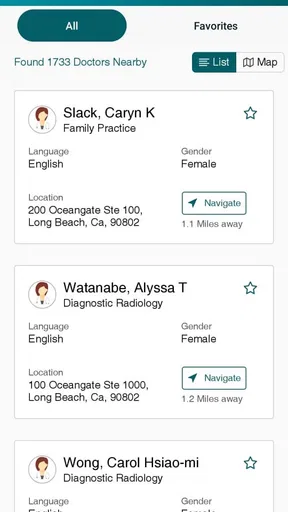
For example, before arranging care, I would use the provider-search option as a starting point, then confirm details with the provider or plan when the choice matters. That extra check is worthwhile because provider availability and plan participation can be situation-specific. The app can help narrow the search, but I would not treat a directory result as a guarantee that a particular service is covered or that an appointment is available.
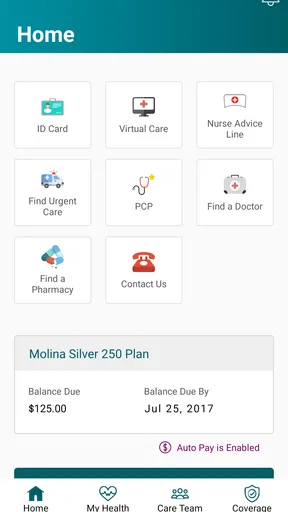
Viewing an ID card on a phone is another recurring convenience, especially for someone who tends to leave physical documents at home. I would still keep a backup approach for situations when the phone is out of battery, offline, or unavailable. Digital access is most useful when it reduces everyday carrying and searching; it works less well as the only plan for a clinic visit.
Worth Reading Before You Choose

EA SPORTS FC Mobile 26 Is a Bigger Football Game, but It Takes Time

Flipboard Shows What News Apps Must Do Beyond the Feed

Switching to Android Auto Means Rethinking Your Driving Routine

Google Calendar Makes a Crowded Week Easier to Manage

Ludo King Makes the Most of the Minutes Between Plans

Baby Panda World Brings Quick Play to Modern Phones, but Its Game Library Feels Busy
What is My Molina?
So, what exactly is My Molina? Simply put, it’s a mobile app designed for Molina Healthcare members. It offers a one-stop shop for accessing your health plan details, finding healthcare providers, and managing your health records. The app is available on both Android and iOS, making it super accessible whether you're team Android or iPhone.
Who gets the most from it
The best fit is a Molina member who wants a convenient phone-based route to plan information and is comfortable checking an app before contacting customer support or a provider. It may be particularly useful if you help keep track of a household’s healthcare paperwork, though each person’s account and information still need to be handled appropriately. A caregiver should not assume that one person’s login automatically provides access to another member’s details.
It is less compelling if you rarely use digital tools, prefer speaking with a representative for every plan question, or are not enrolled with Molina. It is also not a replacement for a clinician, urgent-care service, or emergency help. Its role is administrative: it can make member tasks more accessible, but it cannot assess symptoms or decide what treatment you need.
How it compares with other ways to manage a plan
Compared with keeping a printed card and calling for every question, a member app can be quicker for routine lookups and convenient when you are away from home. Compared with a health plan’s website, a phone app is naturally easier to reach during an errand or appointment, while a larger screen can be more comfortable for reviewing information at length. I would use whichever route fits the task rather than insisting that the app replace every other channel.
The trade-off is that an app concentrates access on a device and account. A login problem, an outdated phone, or a screen that is difficult to use can make the digital route less convenient than paper or a phone call. Keeping your physical card and knowing how to contact the plan are sensible backups, not signs that the app has failed.
User Interface and Experience
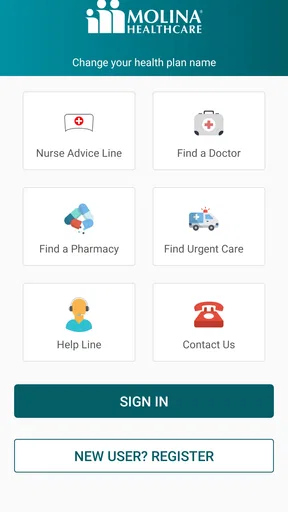
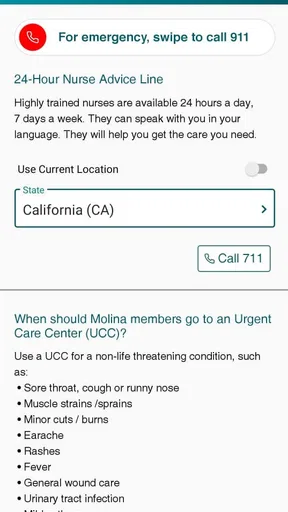
First impressions count, and the user interface of My Molina makes a great one. The app sports a clean, intuitive design that feels both modern and user-friendly. Navigation is a breeze, thanks to well-organized menus and clear icons. Even if you’re not tech-savvy, you’ll find it easy to get around the app.
One thing I really appreciate is the simplicity of the dashboard. Everything you need is right at your fingertips, from viewing your benefits to checking on your claims. It feels like the app was designed with the user in mind, which is always a plus in my book.
A practical workflow for appointments and claims
When an appointment is coming up, I would use the app as one step in a short preparation routine: check the plan details that seem relevant, locate the digital ID card, and write down any questions that still need a direct answer. This is more dependable than assuming a quick glance settles every coverage question. If a procedure, specialist visit, or other costly service is involved, I would verify the specifics with the plan and provider before treating an in-app result as final.
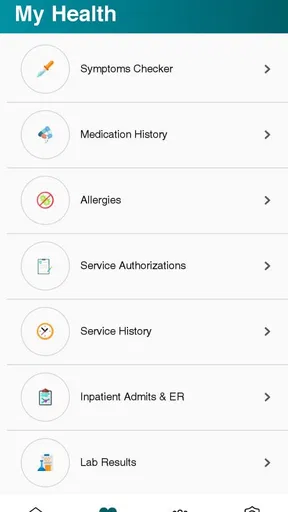
Claims information can also be useful after care, when you want to understand what has happened without searching through a stack of mail. I would check it when I receive a bill or notice, then compare the details with the provider’s paperwork. If something looks unclear, the app can help me identify what to ask about, but it should not replace a conversation with the plan when a charge or decision needs explanation.
Features You’ll Love
Now, let’s talk features. My Molina comes packed with a variety of functionalities that are genuinely useful. Need to know what’s covered under your plan? Check. Want to find a doctor or a specialist? Double check. You can even view your ID card directly from the app. No more rummaging through your wallet or purse!
Another feature that stands out is the ability to manage your appointments. You can schedule, reschedule, or even cancel appointments right from the app. It’s a real time-saver, especially if you’re juggling a busy schedule.
Small habits that make it more useful
One practical tip is to look around the app when you are not under time pressure. That helps you learn where the ID card, benefits, provider search, and claims information sit before you need them. I would also check that I can sign in after setting up the account, rather than assuming a remembered password or saved session will always be available when I am at a reception desk.
Another useful habit is to treat the app as a record-access tool, not as a substitute for keeping track of important care details. If you have a question about a claim, note the date and the specific item you want clarified before contacting support. That makes the follow-up more focused and avoids repeatedly opening the app without knowing what answer you need.
Maintenance without making it another chore
A member app should not demand constant attention to earn its space. I would keep it available for the occasional task, check for updates when the phone prompts me, and revisit sign-in access if I change devices. The current version is 5.10.27, and the listed minimum Android requirement is 5.1; those details are useful when deciding whether an older phone can run it, but they do not remove the need to keep the operating system and app compatible.
For someone who uses the app only a few times a year, a monthly reminder to open it would be overkill. A better approach is to connect it to a real event: review it when a new appointment is being arranged, when a claim notice arrives, or when you want to confirm what information you have available. That keeps the tool tied to a need rather than turning health-plan management into another routine to maintain.
Security and Privacy
In today’s world, security and privacy are paramount, especially when dealing with healthcare information. The developers of My Molina seem to understand this well. The app uses secure login methods, and your data is encrypted to ensure that it’s safe from prying eyes. It’s reassuring to know that they take user privacy seriously.
Where the convenience can wear thin
The same account protection that makes a health app appropriate for sensitive information can make access feel less effortless than opening a public website. If you rarely use the app, you may have to pause to remember your credentials or recover access. I would avoid waiting until a time-sensitive appointment to discover that I cannot sign in; testing access in advance is a small effort with a practical payoff.
There is also a natural limit to how much an insurer’s app can simplify healthcare. Searching for a provider, viewing coverage, and checking a claim help with administration, but they do not guarantee that a search result is the right clinical choice or that every billing question is resolved on screen. When something has financial or medical consequences, I would use the app to prepare and then confirm the important detail with the appropriate person.
My Molina is free, is rated for Everyone, and comes from Molina Healthcare Inc. It has an average rating of 4.3 from around 3.1 thousand ratings, with over 500 thousand installs. Those figures suggest it has reached many members, but the more relevant test for me is whether the tools match my own plan and habits. A broad audience does not make it useful to someone who is not a Molina member.
Room for Improvement
While My Molina is impressive, no app is perfect. Some users might find the initial login process a bit cumbersome, especially if you’re setting it up for the first time. A smoother onboarding process could enhance the overall experience.
Occasional glitches can also occur, though these are few and far between. It’s nothing that a quick app update can’t fix, but it’s worth mentioning if you value seamless operation.
Does it earn a lasting place on your phone?
My long-term view is that this is a utility rather than an app I would expect to open out of habit. It earns its place when I am a Molina member who periodically needs plan details, a provider search, claims information, or an ID card. If those needs come up, having a familiar route to them can save time across the year even if the app sits untouched between tasks.
I would skip it if I wanted a general health tracker, medical advice, or a single tool for managing coverage from different insurers. In those cases, a clinician, a general health resource, or the relevant insurer’s own service is a better match. The app’s narrow focus is also its honest strength: it is most useful when the task is specifically connected to Molina membership.
Final Thoughts
All in all, My Molina is a solid choice for anyone looking to have more control over their healthcare management. Its user-friendly design, combined with a robust set of features, makes it a compelling option for Molina Healthcare members. Sure, there’s room for improvement, but the pros far outweigh the cons.
If you’re a Molina member, give My Molina a try. It’s like having a personal healthcare assistant in your pocket, ready to help you navigate the complexities of health insurance. So go ahead, download it today, and take the stress out of managing your healthcare needs.
Pros
- User-friendly interface for easy navigation.
- Quick access to health plan information.
- Secure login for privacy protection.
- Timely notifications for appointments.
- Detailed billing and payment history.
Cons
- Limited language support options.
- Occasional app crashes reported.
- Some features require internet access.
- Infrequent updates on new features.
- Limited personalization settings.
FAQs for My Molina
What is My Molina and what can I do with it?
My Molina is a mobile application designed to help Molina Healthcare members manage their health plans easily. With this app, users can view their benefits, check claim statuses, find healthcare providers, and access their ID cards. It offers a convenient way to manage your healthcare needs right from your smartphone.
Is My Molina available for both Android and iOS devices?
Yes, My Molina is available for download on both Android and iOS platforms. You can find it on the Google Play Store for Android devices and the Apple App Store for iOS devices, ensuring a wide range of users can access its features and benefits easily.
How secure is my personal information on the My Molina app?
My Molina takes the security of your personal information seriously. The app uses encryption and other advanced security measures to protect your data. Additionally, users are encouraged to use strong passwords and keep their login credentials confidential to enhance security further.
Can I use My Molina to pay my healthcare bills?
Yes, the My Molina app allows users to pay their healthcare bills directly within the application. This feature provides a convenient and secure way to manage and settle payments, ensuring that you can handle all your healthcare-related finances in one place.
What should I do if I encounter issues while using the My Molina app?
If you experience any problems while using the My Molina app, you can contact Molina Healthcare’s customer support for assistance. The app also includes a help section with FAQs and troubleshooting tips that can resolve common issues, providing immediate solutions at your fingertips.


